Introduction
Every new ClickHouse® release introduces performance improvements, new features, and occasionally behavioral changes that improve SQL standards compliance. One such change in ClickHouse® 26.3 affects how the NOT operator is parsed and evaluated.
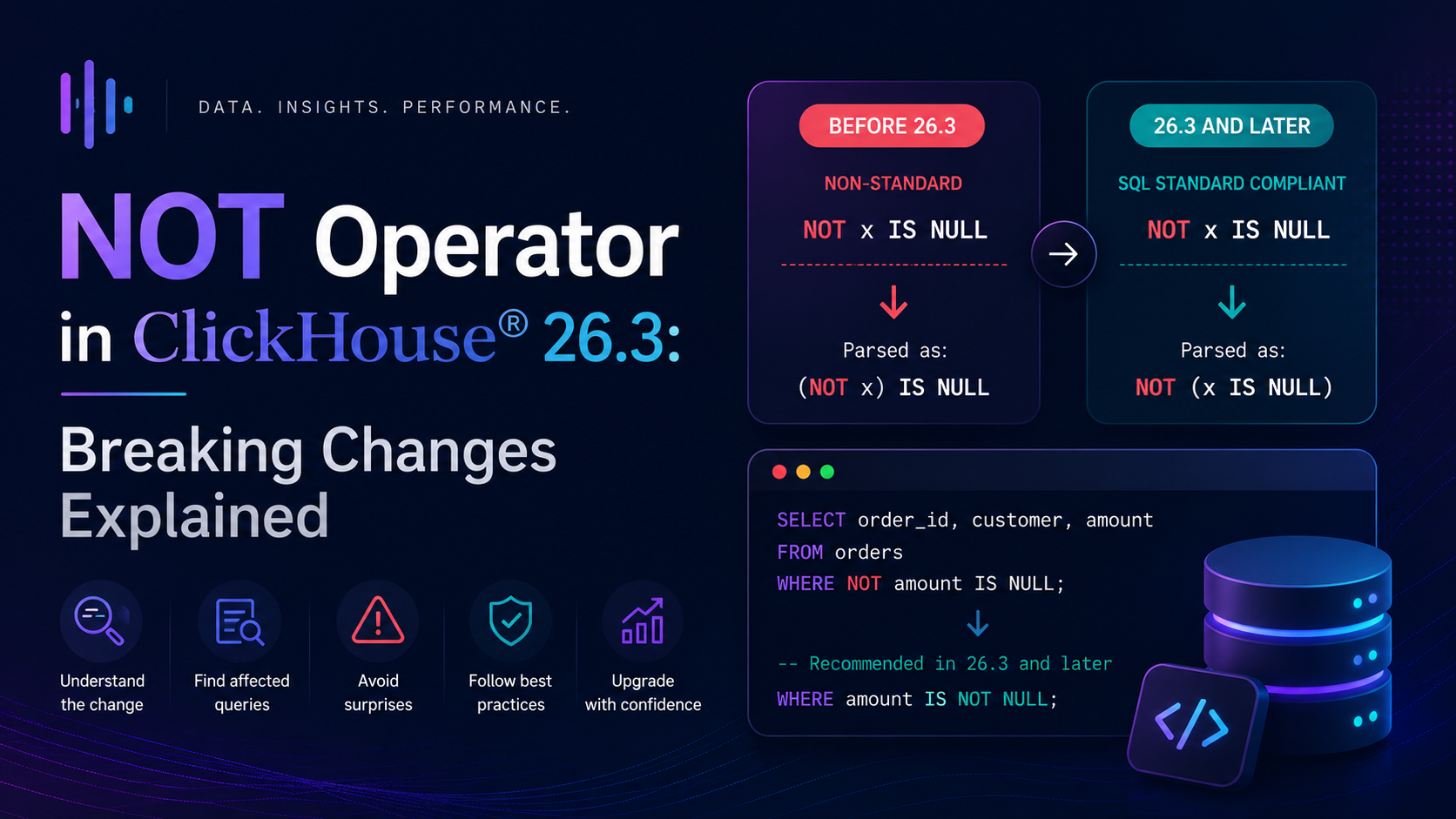
The NOT operator precedence now matches the SQL standard, so NOT x IS NULL is now parsed as NOT (x IS NULL).
This change makes ClickHouse® more compliant with standard SQL behavior, but if your existing queries relied on the old parsing behavior, they may now produce different results without any error or warning. This is the kind of silent breaking change that is easy to miss during an upgrade.
In this blog, we'll explore what changed in ClickHouse® 26.3, how it affects existing SQL queries, common migration scenarios, and best practices for writing future-proof queries.
Why Was This Change Introduced?
Prior to ClickHouse® 26.3, ClickHouse® sometimes parsed expressions containing NOT differently from standard SQL.
The new parser now follows SQL operator precedence more closely, making query behavior more predictable and consistent with other relational database systems.
This improves:
- SQL standard compliance
- Query readability
- Cross-database compatibility
- Predictable operator precedence
What Changed in 26.3?
Before 26.3, ClickHouse® parsed NOT with a different operator precedence than the SQL standard. This meant that expressions like:
NOT x IS NULLwere previously parsed as:
(NOT x) IS NULLStarting from ClickHouse® 26.3, the same expression is now parsed as:
NOT (x IS NULL)This is the correct SQL standard behavior and what most SQL databases including PostgreSQL, MySQL, and BigQuery have always done.
Why Does Operator Precedence Matter?
Operator precedence determines how SQL expressions are grouped when there are no explicit parentheses. Just like in mathematics where 2 + 3 × 4 equals 14 (not 20) because multiplication has higher precedence than addition, SQL operators have a defined precedence order.
In standard SQL, IS NULL has higher precedence than NOT. So:
NOT x IS NULLshould always mean:
NOT (x IS NULL)
-- i.e. "x is NOT NULL"
Before 26.3, ClickHouse® was treating NOT as having higher precedence than IS NULL, effectively parsing it as:
(NOT x) IS NULL
-- i.e. "the negation of x is null"
These two expressions produce completely different results and neither raises an error.
Concrete Example
Let's walk through a concrete example to see the impact.
Sample table:
CREATE TABLE default.orders (
    order_id   UInt32,
    customer   String,
    amount     Nullable(Float64),
    order_date Date
) ENGINE = MergeTree()
ORDER BY order_id;

INSERT INTO default.orders VALUES
    (1, 'Alice',   1200.00, '2024-01-01'),
    (2, 'Bob',     NULL,    '2024-01-02'),
    (3, 'Charlie', 890.00,  '2024-01-03'),
    (4, 'Diana',   NULL,    '2024-01-04');
The query:
SELECT order_id, customer, amount
FROM default.orders
WHERE NOT amount IS NULL;
Before 26.3 - old behavior:
ClickHouse® parsed this as (NOT amount) IS NULL - which is asking whether the negation of amount is NULL. Since NOT applied to a numeric value is not straightforward, this produced unexpected or inconsistent results.
After 26.3 - new behavior:
ClickHouse® now correctly parses this as NOT (amount IS NULL), which is asking for rows where amount is NOT NULL.
| order_id | customer | amount |
|---|---|---|
| 1 | Alice | 1200.00 |
| 3 | Charlie | 890.00 |
The new behavior is correct and matches every other major SQL database. However, if your query was written expecting the old behavior, the results will silently change.
Other SQL Compatibility Changes in 26.3
The NOT operator precedence fix was part of a broader set of SQL compatibility improvements in 26.3:
NOW and CURRENT_DATE without parentheses - these functions can now be called without parentheses, matching standard SQL syntax:
SELECT NOW, CURRENT_DATE, CURRENT_TIMESTAMP;SOME keyword - now supported as an alias for ANY, matching standard SQL:
SELECT * FROM t WHERE x = SOME (SELECT y FROM u);Parenthesized table join expressions - now supported:
SELECT * FROM (t1 CROSS JOIN t2) JOIN t3 ON ...How to Detect Affected Queries
The tricky part about this change is that it does not raise an error. Queries continue to run, they just return different results. Here is how to find potentially affected queries in your environment.
Search your query log for NOT ... IS NULL patterns:
SELECT
    query,
    event_time,
    user
FROM system.query_log
WHERE type = 'QueryFinish'
  AND query ILIKE '%NOT%IS NULL%'
  AND event_time >= now() - INTERVAL 30 DAY
ORDER BY event_time DESC
LIMIT 50;
Also search for NOT ... IS NOT NULL patterns:
SELECT query
FROM system.query_log
WHERE type = 'QueryFinish'
  AND query ILIKE '%NOT%IS NOT NULL%'
ORDER BY event_time DESC
LIMIT 50;
Any query matching these patterns should be reviewed and tested against the new behavior.
How to Fix Affected Queries
The fix is simple always use explicit parentheses to make operator precedence unambiguous. This is a best practice regardless of which version of ClickHouse® you are on.
Before (ambiguous):
-- Ambiguous - behavior changed in 26.3
WHERE NOT amount IS NULL
After (explicit and safe):
-- Use explicit parentheses - works correctly in all versions
WHERE NOT (amount IS NULL)

-- Or better - use the more readable IS NOT NULL directly
WHERE amount IS NOT NULL
More examples:
-- Ambiguous before 26.3
WHERE NOT status IS NULL
WHERE NOT country IS NULL

-- Fixed versions
WHERE status IS NOT NULL
WHERE country IS NOT NULL

-- Or with explicit parentheses
WHERE NOT (status IS NULL)
WHERE NOT (country IS NULL)
The cleanest fix in most cases is to replace NOT x IS NULL with x IS NOT NULL - which is unambiguous, more readable, and works identically across all SQL databases and all ClickHouse® versions.
Version Compatibility
| ClickHouse® Version | NOT x IS NULL parsed as | Behavior |
|---|---|---|
| Before 26.3 | (NOT x) IS NULL | Non-standard |
| 26.3 and later | NOT (x IS NULL) | SQL standard compliant |
Upgrade Checklist for 26.3
If you are upgrading to ClickHouse® 26.3 or later, check the following before going to production:
| Step | Action |
|---|---|
| 1 | Search query_log for queries containing NOT ... IS NULL patterns |
| 2 | Review application code for SQL queries containing NOT ... IS NULL |
| 3 | Review Materialized View definitions for NOT ... IS NULL patterns |
| 4 | Replace NOT x IS NULL with x IS NOT NULL wherever applicable |
| 5 | Add explicit parentheses to any remaining complex NOT expressions |
| 6 | Test queries on a staging cluster running ClickHouse® 26.3 before upgrading production |
Best Practices Going Forward
- Always use explicit parentheses in complex
NOTexpressions - never rely on implicit operator precedence. - Prefer
IS NOT NULLoverNOT x IS NULL- it is cleaner, more readable, and unambiguous in every SQL dialect. - Test on staging first - always validate query results on a 26.3 staging cluster before upgrading production.
- Review Materialized Views - they run automatically in the background and a silent result change here can corrupt aggregated data without any obvious error.
- Check your async insert behavior - with async inserts now enabled by default, applications that relied on synchronous insert acknowledgment may need to configure
wait_for_async_insert = 1explicitly.
Final Thoughts
The NOT operator precedence change in ClickHouse® 26.3 is a small but important SQL correctness fix. It brings ClickHouse® in line with the SQL standard and every other major SQL database, but it is a silent breaking change that can alter query results without raising any errors.
The fix is straightforward replace NOT x IS NULL with x IS NOT NULL or add explicit parentheses. The key is to find all affected queries before upgrading, not after.